Classroom & live online 60 Hours Verifiable certificate Syllabus ↓

Photoshop For Fashion Design Course

Learn Photoshop for fashion design: fabric rendering, prints, mood boards and portfolios.

Your roadmap — from admission to certificate

  1. Free counselling

    Talk to our counsellor — choose the right course, batch time and mode.

  2. Admission

    Join at a CADD centre near you or online. You get your student login and ID card.

  3. Learn step by step

    60 Hours of hands-on Photoshop For Fashion Design classes — in the classroom or live online.

    File managementBasic Image ManipulationSelection toolsDrawing ToolsPainting ToolsBrush SettingLayerAdvanced LayerUsing Channel & MaskingColor Basics
  4. Practice & project

    Exercises in every class and a final project, checked by your trainer.

  5. Course completion certificate + completion badge

    Finish the course and get your course-completion certificate and a digital completion badge with your name.
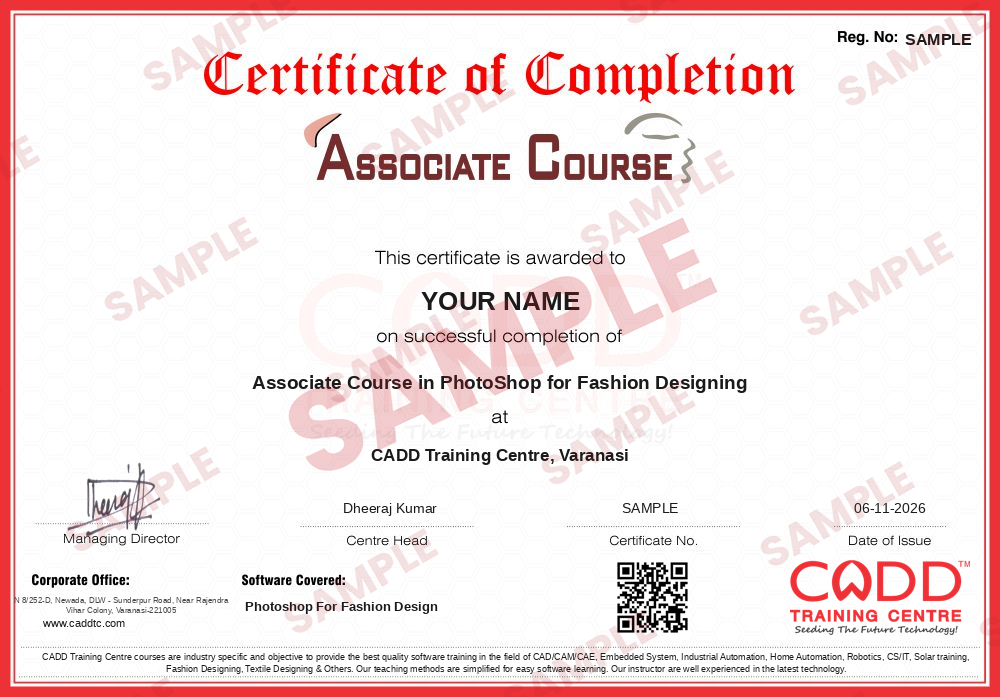
    Sample course-completion certificate — Associate Course in PhotoShop for Fashion Designing
    Course-completion certificate (sample) — Associate Course in PhotoShop for Fashion Designing · verifiable online
    Course-completion badge — Associate Course in PhotoShop for Fashion Designing
    Course-completion badge
    Course
    Associate Course in PhotoShop for Fashion Designing
    Issued by
    CADD Training Cetre
    Training
    Classroom or live online
    How to earn
    Complete the course and its project
    With your name and year · its own verify link · “Add to profile” on LinkedIn
  6. Certification exam

    Take the certification exam: a theory test and a practical task — at the centre or online.

  7. Certified certificate + marksheet

    Pass the exam and get the certified certificate with your marksheet. Anyone can check it online with its QR code.

  8. Certified badge

    Your certified badge — add it to LinkedIn and share it anywhere; it opens its own verify page.
    Certified badge — Associate Course in PhotoShop for Fashion Designing
    Certified badge
    Course
    Associate Course in PhotoShop for Fashion Designing
    Issued by
    CADD Training Cetre
    Training
    Classroom or live online
    How to earn
    Pass the certification exam
    You also get
    Certified certificate + marksheet
    With your name and year · its own verify link · “Add to profile” on LinkedIn
  9. Make your CV & apply for jobs

    Make your CV in your student panel (Career → My CV) — your course, certificates and projects are added for you. Send it as a link with a preview picture, and apply to jobs and Hire Me requests from companies.

About the Photoshop For Fashion Design course

Adobe Photoshop is the raster editing program that fashion studios turn to whenever a design needs colour, texture and visual mood. Designers scan or draw sketches and render them with fabric shading and folds, assemble mood and trend boards for a new season, test colourways in minutes and retouch model and product photographs for look books, e-commerce listings and portfolios.

Photoshop for Fashion Design is a 60-hour programme built around the designer's own workflow rather than general photo editing. After learning the workspace, brushes, layers and selections, you render textiles such as denim, silk and knits, use masks and adjustment layers to switch colourways, create seamless prints and place them onto garment flats, and prepare colour and trend boards for a collection. Photo retouching and colour correction for shoots follow, and the course ends with a polished digital fashion portfolio ready for print and online sharing. Most class time is hands-on practice, offered in the classroom at CADD centres or in live online batches.

The skills support work as a fashion illustrator, design assistant, textile print designer or e-commerce image editor. Many students continue with Illustrator or CorelDRAW for Fashion Design to add precise vector flats and tech packs.

You will be able to

  • Render fabric textures, folds and shading on fashion sketches using brushes and layers
  • Create mood boards, colour boards and trend boards for a collection
  • Design seamless prints and patterns and apply them to garment flats
  • Use selections, masks and adjustment layers to change colourways quickly
  • Retouch and colour-correct model and product photographs for look books
  • Prepare a professional digital fashion portfolio for print and online use

Who it is for

  • Fashion design students in diploma and degree programmes
  • Boutique owners and tailors who want to show designs digitally
  • Working fashion designers moving from hand rendering to digital
  • Merchandisers and stylists who prepare presentation boards

What you need

  • Basic computer skills and familiarity with files and folders
  • Basic fashion sketching knowledge is useful but not compulsory
  • A graphics tablet is optional; a Windows PC with 8 GB RAM is advised for live online classes

Courses that include Photoshop For Fashion Design

Associate Course in PhotoShop for Fashion DesigningAssociate Course · 60 Hours
Enquire →
Certificate Course in PhotoShop For Fashion DesigningCertificate Course · 60 Hours
Enquire →
Professional Course in Fashion DesigningProfessional Course · 180 Hours · 3 software
Enquire →
Professional Course in Fashion DesigningProfessional Course · 180 Hours · 3 software
Enquire →
Master Course in Fashion DesigningMaster Course · 240 Hours · 4 software
Enquire →
Fashion Designer (CAD) – Associate Career ProgramAssociate Career Program · 300 Hours · 5 software
Enquire →
Fashion Designer (CAD) – Professional Career ProgramProfessional Career Program · 420 Hours · 7 software
Enquire →

Photoshop For Fashion Design Syllabus

15 chapters · 138 topics
01 File management 13 topics
  1. New File
  2. Open file
  3. Open Image
  4. Save & save as
  5. Creating Custom Workspaces
  6. Save for web
  7. Viewing Document Information
  8. Import and export file
  9. Undoing Mistakes and The History Palette
  10. Display Guides
  11. Setting Preference
  12. Zooming & Panning an Image
  13. Working with Multiple Images, Rulers, Guides & Grids
02 Basic Image Manipulation 8 topics
  1. Bitmap Image
  2. Vector Image
  3. Image Size & Revolution Setting
  4. Scanning Image
  5. Create New Image
  6. Placing File
  7. Open image By Drag And drop
  8. Trace Image
03 Selection tools 10 topics
  1. Lasso tool
  2. Polygonal lasso tool
  3. Magic wand tool
  4. Quick selection tool
  5. Magnetic lasso tool
  6. Rectangular Marquee tool
  7. Elliptical Marquee
  8. Path Selection Tool
  9. Direct Selection tool
  10. Invert
04 Drawing Tools 7 topics
  1. Raster vs Vector
  2. Shape Layer & Shape Options
  3. Using The Shape tools
  4. Using The Pen Tools
  5. Using the Anchor point Tool
  6. Using The Path Palette
  7. Working with Path
05 Painting Tools 10 topics
  1. Brush Tool
  2. Blending mode
  3. Pencil tool
  4. Mixture Brush tool
  5. Erase Tool
  6. Magic Erase Tool
  7. Background Erase Tool
  8. Using the art history Brush
  9. Using the History Brush
  10. Define Brush Preset
06 Brush Setting 11 topics
  1. Using the Brushes Palette
  2. Creating Custom Brush Tips By Selection
  3. Creating Custom Brush Tips in the Brushes Palette
  4. Setting Shape Dynamics
  5. Setting Brush Scattering
  6. Setting Brush Texture
  7. Setting Dual Brushes
  8. Setting Color Dynamics
  9. Miscellaneous Brush Settings
  10. Clearing Brush Settings
  11. Setting Other Dynamics
07 Layer 6 topics
  1. Using the Layer & Layer sets
  2. Creating a layer & Layer sets
  3. Stacking a linking layer
  4. Moving Layer Content with the move tools
  5. Locking layer
  6. Merging & Flattering Layers
08 Advanced Layer 6 topics
  1. Add a layer style
  2. Add Layer a mask
  3. Create new fill or Adjustment Layer
  4. Creating New Group
  5. Creating Clipping mask
  6. Blending Modes, Opacity & Fill
09 Using Channel & Masking 5 topics
  1. Using Channel
  2. Spot Color
  3. Blending channels and Layers
  4. Mask
  5. Using Alpha Channel
10 Color Basics 6 topics
  1. Color Modes and Conversion
  2. Color management
  3. Foreground and background color
  4. Using the color picker
  5. Selecting color with the color palette
  6. Selecting color with the Swatches palette
11 Filling and Stroking 7 topics
  1. Appling fills
  2. Use the paint bucket tool
  3. Use the gradient tool
  4. Use the gradient editor
  5. Using patterns
  6. Using the pattern makers
  7. Stroking
12 Manipulating Image and retouching Tools 19 topics
  1. Changing the canvas size
  2. Rotating and flipping image
  3. Cropping image
  4. The free transform command
  5. The smudge tool
  6. Blurring and sharpening images
  7. Using the dodge tool and the burn tool
  8. The sponge tool
  9. Filters and the filter gallery
  10. The liquefy command
  11. The clone stamp tool
  12. The pattern stamp tool
  13. The healing brush tool
  14. The patch tool
  15. The color replacement tool
  16. Using the Spot Healing Brush Tools
  17. Content-Aware move Tool
  18. Red eye Tools
  19. Retouching on Separate Layer
13 Adjustment and Filter Effect 13 topics
  1. Brightness/Contrast
  2. Level
  3. Curves
  4. Hue/Saturation
  5. Color Balance
  6. Black and White
  7. Photo Filter
  8. Shadows/ Highlights
  9. Desaturation
  10. Blur
  11. Distort
  12. Noise
  13. Render
14 Text 9 topics
  1. Text Basic
  2. Entering a Text
  3. Selecting a Text
  4. Edit The Bounding Box
  5. Creating a type selection
  6. Appling effect to Type Layers
  7. Using the Character Palette
  8. Checking for SPL error
  9. Using the Paragraph Palette
15 Working with Pattern fill 8 topics
  1. Fill Scale Pattern
  2. Clip Mask
  3. Warping
  4. Puppet Warp
  5. Displace
  6. Dodge Burn Pattern
  7. Swap Pattern
  8. org Layers

Ratings & reviews

Students rate the course after they finish it — their ratings appear here.

Photoshop For Fashion Design course — FAQ

How is Photoshop used in fashion design?

Fashion designers use Photoshop to colour and render sketches, add fabric textures, build mood and trend boards, test colourways, create prints and retouch photo shoots for look books and portfolios.

Can I learn Photoshop for fashion design without computer experience?

Yes. If you can use a computer for everyday tasks, you can join. The trainer begins with the workspace and core tools and then moves to fashion-specific work step by step.

What is the duration of the Photoshop for Fashion Design course?

The course is 60 hours long, with most of the time spent on practical exercises such as rendering garments, making boards and assembling a portfolio.

Are Photoshop fashion classes available online?

Yes. Besides classroom training at CADD centres, Photoshop for Fashion Design runs as live online classes in which you render garments and build boards on your PC while the instructor reviews them.

Will I receive a certificate for this course?

Yes. A CADD Training Centre certificate is issued when you finish the Photoshop for Fashion Design course, and a fashion studio can check it online by scanning its QR code.

What careers does Photoshop for fashion design help with?

It supports roles such as fashion designer, fashion illustrator, design assistant, textile print designer, merchandiser, e-commerce image editor and freelance portfolio designer.

Should fashion designers learn Photoshop or Illustrator first?

Many begin with Photoshop for rendering and boards, then learn Illustrator or CorelDRAW for precise vector flats and tech packs. Together they cover the full digital workflow of a fashion studio.

More questions? Ask our counsellor or read the general FAQ.

Photoshop For Fashion Design60 Hours
Enquire now