Classroom & live online60 HoursVerifiable certificateSyllabus ↓
CorelDraw for Jewellery Design Course
Learn CorelDRAW for jewellery design: vector sketches, motifs, gem layouts, colour renders and catalogue sheets.
Your roadmap — from admission to certificate
1
Free counselling
Talk to our counsellor — choose the right course, batch time and mode.
2
Admission
Join at a CADD centre near you or online. You get your student login and ID card.
3
Learn step by step
60 Hours of hands-on CorelDraw for Jewellery Design classes — in the classroom or live online.
CorelDRAW Interface and BasicsDrawing Tools for JewelleryShaping and Repeating ElementsGemstones and SettingsColour, Fills and RenderingDesigning Jewellery PiecesText, Bitmaps and PresentationOutput and Portfolio Project
4
Practice & project
Exercises in every class and a final project, checked by your trainer.
5
Course completion certificate + completion badge
Finish the course and get your course-completion certificate and a digital completion badge with your name.
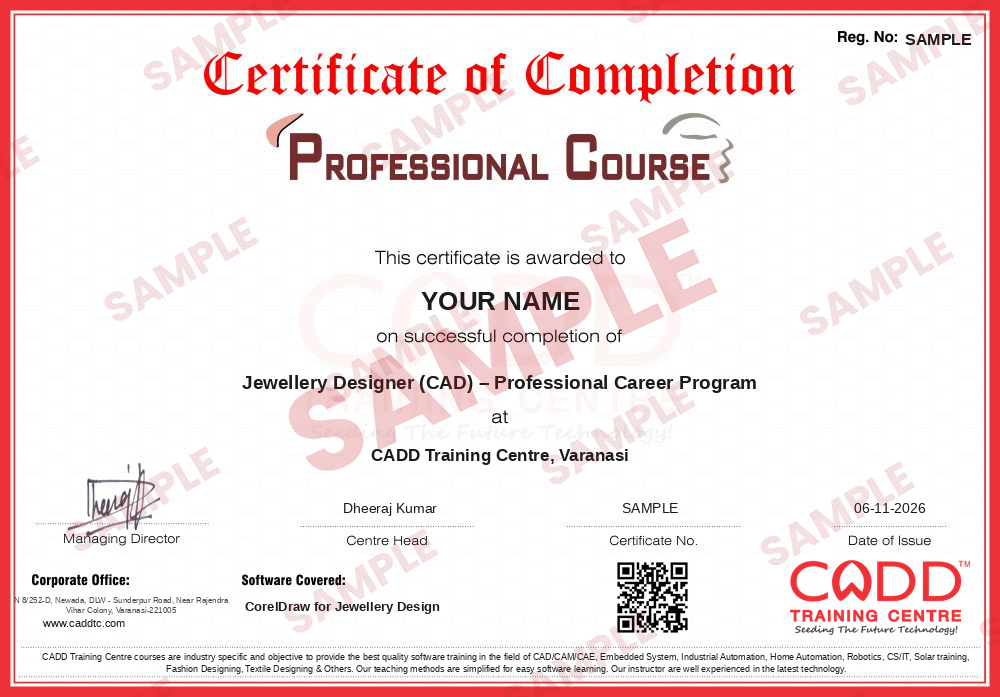
Course-completion certificate (sample) — Jewellery Designer (CAD) – Professional Career Program · verifiable online
Course-completion badge
Course
Jewellery Designer (CAD) – Professional Career Program
Issued by
CADD Training Cetre
Training
Classroom or live online
How to earn
Complete the course and its project
With your name and year · its own verify link · “Add to profile” on LinkedIn
6
Certification exam
Take the certification exam: a theory test and a practical task — at the centre or online.
7
Certified certificate + marksheet
Pass the exam and get the certified certificate with your marksheet. Anyone can check it online with its QR code.
8
Certified badge
Your certified badge — add it to LinkedIn and share it anywhere; it opens its own verify page.
Certified badge
Course
Jewellery Designer (CAD) – Professional Career Program
Issued by
CADD Training Cetre
Training
Classroom or live online
How to earn
Pass the certification exam
You also get
Certified certificate + marksheet
With your name and year · its own verify link · “Add to profile” on LinkedIn
9
Make your CV & apply for jobs
Make your CV in your student panel (Career → My CV) — your course, certificates and projects are added for you. Send it as a link with a preview picture, and apply to jobs and Hire Me requests from companies.
CorelDraw is an industry-acclaimed graphic design solution designed by the Corel Corporation (a Canadian-based company). The application comes with a suite of innumerable, cutting-edge features that help users create beautiful photos, graphics, designs, and websites. Besides, the features are expertly crafted to meet the growing needs of customers across different industries.
At the same time, CorelDraw Graphic Suite 2017 is an innovative graphic design application that amplifies user’s creativity regardless of their talents, passion, and interests. The suite provides an array of seven powerful solutions that support different types of innovations. The applications include CorelDraw 2017, Corel Font Manager 2017, CorelCONNECT 2017, CorelPHOTO PAINT 2017, Corel Website Creator, Corel PowerTrace 2017, and Corel CAPTURE 2017.
You will be able to
Use CorelDRAW tools to draw clean vector jewellery designs
Create motifs, filigree patterns and repeating elements
Lay out gemstones, settings and metal parts accurately
Colour and shade designs to show gold, silver and stones
Design rings, pendants, earrings, necklaces and bangles
Prepare design sheets and catalogue pages for clients
Build a jewellery design portfolio from course projects
Who it is for
Jewellery design students and aspiring jewellery designers
Goldsmiths and family jewellery businesses
Fashion and accessory design students
Jewellery showroom staff who prepare client designs and catalogues
What you need
Basic computer skills
Interest in jewellery, drawing or design
For live online classes: a Windows PC with 8 GB RAM and stable internet
Courses that include CorelDraw for Jewellery Design
Jewellery Designer (CAD) – Professional Career ProgramProfessional Career Program · 150 Hours · 4 software
Drawing round, oval, pear, marquise and emerald cut stones
Prong, bezel and pave layouts
Stone arrangement along paths
Grouping and combining elements
Creating a stone and setting library
05Colour, Fills and Rendering5 topics+
Uniform, fountain and pattern fills
Gold, rose gold and silver metal effects
Gem colours and highlights
Transparency, shadows and bevel effects
Mesh fill for realistic shading
06Designing Jewellery Pieces5 topics+
Rings: top view and side view
Pendants and earrings
Necklaces and chains
Bangles and bracelets
Bridal and temple jewellery sets
07Text, Bitmaps and Presentation5 topics+
Artistic and paragraph text
Importing photos and tracing bitmaps
PowerTRACE for sketches
Design sheets with sizes and notes
Catalogue page layout
08Output and Portfolio Project4 topics+
Export to PDF, JPG and PNG
Print setup for design sheets
Project: complete jewellery collection
Portfolio review and certificate assessment
Ratings & reviews
Students rate the course after they finish it — their ratings appear here.
CorelDraw for Jewellery Design course — FAQ
Can CorelDRAW be used for jewellery design?
Yes. CorelDRAW's vector tools let designers draw precise rings, pendants, earrings and necklaces, add gemstones and metal colours, and prepare design sheets and catalogue pages that jewellers can show to customers.
Who can join the CorelDRAW jewellery design course?
Jewellery design students, goldsmiths, family jewellery business owners and fashion students can join. Only basic computer skills are needed.
How long is the CorelDRAW for Jewellery Design course?
The course is 60 hours long, ending with a jewellery collection project for your portfolio.
Is the jewellery design course available online?
Yes. Pick a classroom batch at a CADD centre or join live online CorelDRAW for Jewellery Design classes; online, you draw rings, pendants and gem layouts on your PC while the trainer reviews them.
What certificate will I get?
A CADD Training Centre certificate is given after CorelDRAW for Jewellery Design. Each one carries a QR code and a unique number, letting a jewellery manufacturer verify it online.
What jobs are there for jewellery designers who know CorelDRAW?
Jewellery designer, CAD design assistant, catalogue designer and showroom design executive roles in jewellery manufacturers, exporters and retail brands. Career guidance and placement support are provided.
Should I learn CorelDRAW or Rhino for jewellery design?
CorelDRAW is used for 2D design sheets and colour renders, while Rhino or MatrixGold is used for 3D models for casting. Many designers learn CorelDRAW first and then move to 3D jewellery CAD.