Classroom & live online 40 Hours Verifiable certificate Syllabus ↓

Mastercam Associate Course

Mastercam Associate course: 2D geometry, mill and lathe toolpaths, verify and post G-code.

Your roadmap — from admission to certificate

  1. Free counselling

    Talk to our counsellor — choose the right course, batch time and mode.

  2. Admission

    Join at a CADD centre near you or online. You get your student login and ID card.

  3. Learn step by step

    40 Hours of hands-on Mastercam Associate classes — in the classroom or live online.

    Mastercam Basics2D Wireframe GeometrySolids for MachiningMill Machine Setup2D Mill ToolpathsVerify, Edit and PostLathe BasicsAssociate Project and Practice
  4. Practice & project

    Exercises in every class and a final project, checked by your trainer.

  5. Course completion certificate + completion badge

    Finish the course and get your course-completion certificate and a digital completion badge with your name.
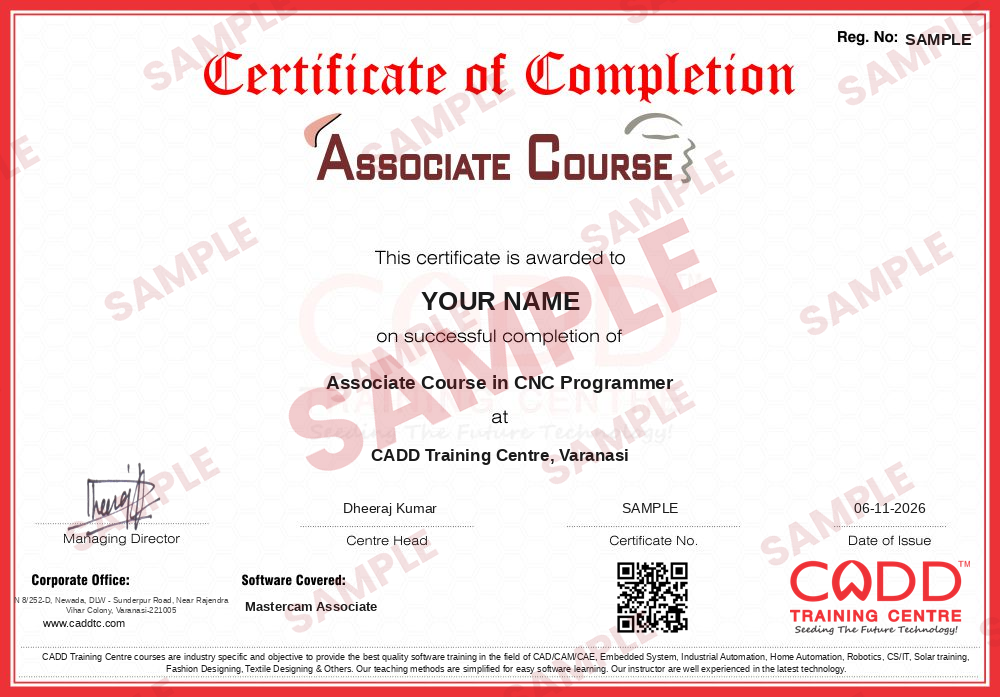
    Sample course-completion certificate — Associate Course in CNC Programmer
    Course-completion certificate (sample) — Associate Course in CNC Programmer · verifiable online
    Course-completion badge — Associate Course in CNC Programmer
    Course-completion badge
    Course
    Associate Course in CNC Programmer
    Issued by
    CADD Training Cetre
    Training
    Classroom or live online
    How to earn
    Complete the course and its project
    With your name and year · its own verify link · “Add to profile” on LinkedIn
  6. Certification exam

    Take the certification exam: a theory test and a practical task — at the centre or online.

  7. Certified certificate + marksheet

    Pass the exam and get the certified certificate with your marksheet. Anyone can check it online with its QR code.

  8. Certified badge

    Your certified badge — add it to LinkedIn and share it anywhere; it opens its own verify page.
    Certified badge — Associate Course in CNC Programmer
    Certified badge
    Course
    Associate Course in CNC Programmer
    Issued by
    CADD Training Cetre
    Training
    Classroom or live online
    How to earn
    Pass the certification exam
    You also get
    Certified certificate + marksheet
    With your name and year · its own verify link · “Add to profile” on LinkedIn
  9. Make your CV & apply for jobs

    Make your CV in your student panel (Career → My CV) — your course, certificates and projects are added for you. Send it as a link with a preview picture, and apply to jobs and Hire Me requests from companies.

About the Mastercam Associate course

Mastercam is CAD/CAM software used to turn part geometry into toolpaths and G-code for CNC milling, turning and routing machines. Machine shops, die and mould makers and production companies rely on it to plan how a part will be cut, choose tools and feeds, and generate the program that the machine actually runs.

The Mastercam Associate course is a 40-hour introduction to that workflow. You begin with the interface, levels, planes and 2D wireframe geometry, add simple solids for machining, and then set up a mill machine group with stock, work offsets and tools from the Tool Manager. From there you program facing, contour, pocket, drilling and Dynamic Mill toolpaths, verify them with Backplot and Mastercam Simulator, and post-process the result to NC code with a setup sheet. A lathe section covers facing, turning, grooving, threading and drilling. The course closes with two practice projects, a milled part and a turned shaft, taken from drawing to G-code. Classes are hands-on, in a CADD classroom or live online.

These skills help mechanical and diploma students, ITI holders and CNC operators move towards roles such as CNC programmer, CAM engineer or CNC setter. Pairing the course with CIMCO Edit adds code checking and program transfer to your toolkit.

You will be able to

  • Create and edit 2D wireframe geometry and import part models into Mastercam
  • Set up machine groups, stock, work offsets and tools from the Tool Manager
  • Program 2D mill toolpaths: facing, contour, pocket, drilling and Dynamic Mill
  • Program basic lathe operations: face, rough, finish, groove, thread and drill
  • Verify toolpaths with Backplot and Mastercam Simulator before cutting
  • Post-process toolpaths to G-code and prepare a setup sheet for the operator

Who it is for

  • Mechanical engineering and diploma students who want CAM skills
  • CNC operators and setters who want to move into programming
  • Tool room and production engineers in machining companies
  • Designers who want to take their part models to the machine

What you need

  • Basic computer skills and engineering drawing reading
  • Basic knowledge of CNC machining or G-codes is helpful
  • A Windows PC with 8 GB RAM or more and a dedicated graphics card for live online classes

Courses that include Mastercam Associate

Associate Course in CNC ProgrammerAssociate Course · 80 Hours · 2 software
Enquire →
CNC Programmer – Professional Career ProgramProfessional Career Program · 240 Hours, 3 Months · 7 software
Enquire →

Mastercam Associate Syllabus

8 chapters · 39 topics
01 Mastercam Basics 5 topics
  1. Where CAM fits between design and machining
  2. Interface: ribbon tabs, Toolpaths and Solids managers
  3. Levels, views, planes and the gnomon
  4. Selecting entities and using the AutoCursor
  5. File handling and importing CAD models
02 2D Wireframe Geometry 5 topics
  1. Lines, arcs, circles and rectangles
  2. Fillets, chamfers and offsets
  3. Trim, break, join and modify tools
  4. Dimensioning and analysing geometry
  5. Drawing a part from a 2D engineering drawing
03 Solids for Machining 4 topics
  1. Extrude, revolve and hole features
  2. Fillet and chamfer on solids
  3. Using solid models to chain toolpath geometry
  4. Model prep basics for CAM
04 Mill Machine Setup 5 topics
  1. Selecting a mill machine definition
  2. Machine group properties and stock setup
  3. Work coordinate system and work offsets
  4. Tool Manager: tools, holders and libraries
  5. Feeds, speeds and cutting parameters
05 2D Mill Toolpaths 6 topics
  1. Facing toolpath
  2. Contour with cutter compensation and lead in/out
  3. Pocket and island machining
  4. Dynamic Mill for high-efficiency roughing
  5. Drill, peck drill, tap and circle mill
  6. Chamfer and engraving basics
06 Verify, Edit and Post 5 topics
  1. Backplot and Mastercam Simulator
  2. Toolpath Manager: copy, regenerate and reorder
  3. Transform toolpaths: translate, rotate, mirror
  4. Post-processing to NC code
  5. Setup sheets and operator notes
07 Lathe Basics 5 topics
  1. Lathe machine definition and stock setup
  2. Face, rough and finish turning
  3. Groove, thread and cut-off toolpaths
  4. Drilling on the lathe centre line
  5. Simulating and posting a turned part
08 Associate Project and Practice 4 topics
  1. Project: complete milled part from drawing to G-code
  2. Project: simple turned shaft from drawing to G-code
  3. Checking cycle time and tool list
  4. Practice questions and review

Ratings & reviews

Students rate the course after they finish it — their ratings appear here.

Mastercam Associate course — FAQ

What is Mastercam used for?

Mastercam is CAD/CAM software used to create toolpaths for CNC milling, turning and routing machines. It converts part geometry into G-code that the machine can run.

Who should join the Mastercam Associate course?

It suits mechanical and production students, ITI and diploma holders, CNC operators and tool room staff. Basic drawing reading and computer skills are enough to start.

How many hours is the Mastercam Associate course?

The Mastercam Associate course is 40 hours long and focuses on 2D geometry, mill and lathe toolpaths, simulation and post-processing.

Is Mastercam training available online?

Yes. The Mastercam Associate course is offered at CADD Training Centre classrooms and live online. The trainer shares the screen, and you post simple mill and lathe parts yourself.

Do I get a certificate for the Mastercam course?

You get a CADD Training Centre certificate on completion. It carries a verification code and QR code so any employer can confirm it online.

What jobs can I get after learning Mastercam?

Mastercam skills help in roles such as CNC programmer, CAM engineer, CNC setter and production engineer in machine shops, die and mould shops and component makers.

Is Mastercam hard to learn?

Not if you learn in steps. Starting with 2D geometry and simple mill toolpaths, most students can program basic parts by the end of this course with regular practice.

What is the difference between Mastercam and CIMCO Edit?

Mastercam creates toolpaths and G-code from geometry, while CIMCO Edit is an editor used to check, modify and transfer that code. Many shops use both together.

More questions? Ask our counsellor or read the general FAQ.

Mastercam Associate40 Hours
Enquire now