Classroom & live online80 HoursVerifiable certificateSyllabus ↓
Creo for Design Engineer Course
PTC Creo course for design engineers: sketching, part modeling, sheet metal, assemblies and drawings.
Your roadmap — from admission to certificate
1
Free counselling
Talk to our counsellor — choose the right course, batch time and mode.
2
Admission
Join at a CADD centre near you or online. You get your student login and ID card.
3
Learn step by step
80 Hours of hands-on Creo for Design Engineer classes — in the classroom or live online.
Book CoverIntorduction & Understanding to Creo Parametric ConceptsUsing the Creo Parametric InterfaceSelecting & Editing of Geometry, Features ModelsCreating Sketchers Geometry & Using Sketcher ToolsUsing Sketching & Datum FeaturesCreating Extrudes, Revolves, and RibsCreating Holes, Shells, Draft & PatternCreating Rounds, Chamfers & Using LayersAssembling with Constraints
4
Practice & project
Exercises in every class and a final project, checked by your trainer.
5
Course completion certificate + completion badge
Finish the course and get your course-completion certificate and a digital completion badge with your name.
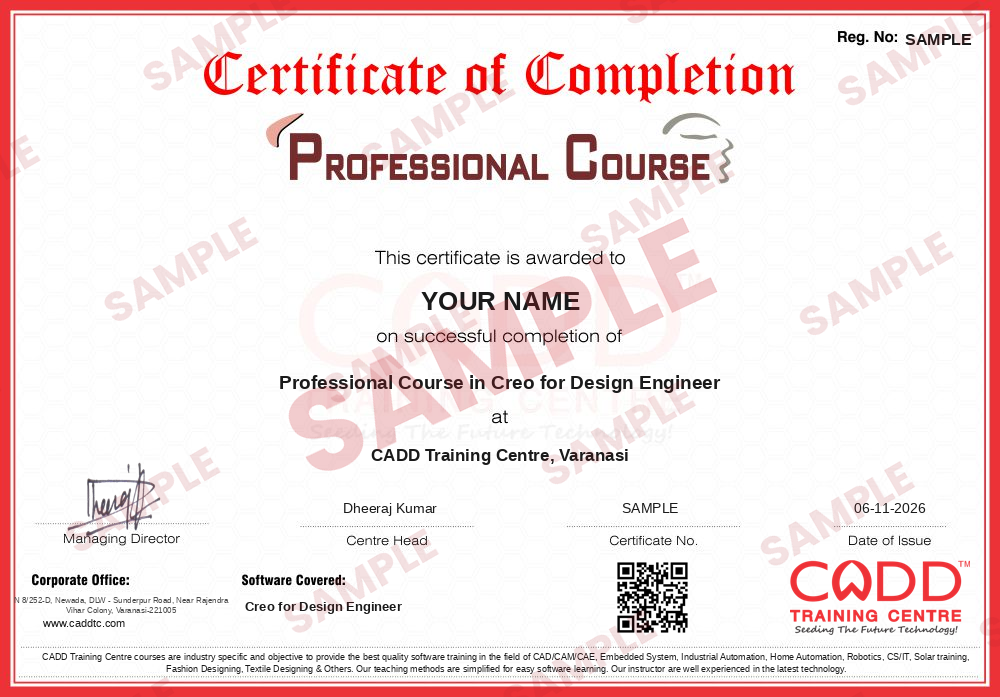
Course-completion certificate (sample) — Professional Course in Creo for Design Engineer · verifiable online
Course-completion badge
Course
Professional Course in Creo for Design Engineer
Issued by
CADD Training Cetre
Training
Classroom or live online
How to earn
Complete the course and its project
With your name and year · its own verify link · “Add to profile” on LinkedIn
6
Certification exam
Take the certification exam: a theory test and a practical task — at the centre or online.
7
Certified certificate + marksheet
Pass the exam and get the certified certificate with your marksheet. Anyone can check it online with its QR code.
8
Certified badge
Your certified badge — add it to LinkedIn and share it anywhere; it opens its own verify page.
Certified badge
Course
Professional Course in Creo for Design Engineer
Issued by
CADD Training Cetre
Training
Classroom or live online
How to earn
Pass the certification exam
You also get
Certified certificate + marksheet
With your name and year · its own verify link · “Add to profile” on LinkedIn
9
Make your CV & apply for jobs
Make your CV in your student panel (Career → My CV) — your course, certificates and projects are added for you. Send it as a link with a preview picture, and apply to jobs and Hire Me requests from companies.
This course aims to help product designers and engineers in developing a product design virtually. Creo is equipped with all the capabilities that are required for completing a product design. This course in Creo will help in sketching, modeling, validation of design, and visualize the product design.
You will be able to
Create fully constrained sketches in Creo Parametric Sketcher
Build parts with extrude, revolve, sweep, blend, hole, round and pattern features
Use datums, relations and family tables for design intent
Design sheet metal parts with walls, bends, forms and flat patterns
Assemble components with constraints and check interference
Create detailed 2D drawings with views, dimensions, tolerances and BOM
Validate and visualise a product design before manufacturing
Who it is for
Mechanical, automobile and production engineering students
Product design and R&D engineers
Mechanical diploma holders and CAD draughtsmen
Engineers in automotive, tooling and heavy engineering companies
What you need
Basic engineering drawing knowledge
Basic computer skills; earlier CAD experience is helpful
For live online classes: a Windows PC with 8 GB RAM or more and a graphics card
Courses that include Creo for Design Engineer
Professional Course in Creo for Design EngineerProfessional Course · 80 Hours
25Introduction, Creating New Drawings & Drawing Views10 topics+
Exploring Drawing Ribbon Commands
Creating Drawings Using Formats and Sheets
Configuring Drawing Models
Adding General Views
Adding Projection Views
Editing Drawing Views
Editing Visible View Area
Adding Detailed Views
Adding 2-D Cross-Section Views
Adding Assembly Exploded Views
26Adding Model Details & Tolerance Information to Drawings6 topics+
Showing Erasing and Deleting Annotations
Adjusting Dimensions and Detail Items
Changing Dimension Display
Configuring Dimensional Tolerances
Setting Up Geometric Tolerance References
Applying Geometric Tolerances
27Adding Notes, Symbols, Tables, Balloons & Layers in Drawings7 topics+
Adding and Editing Notes
Using Surface Finish Symbols
Inserting Tables
Creating Report Tables
Creating BOM Balloons
Using Layers in Drawings
Configuring the Drawing Environment
Ratings & reviews
Students rate the course after they finish it — their ratings appear here.
Creo for Design Engineer course — FAQ
What is Creo used for?
PTC Creo Parametric is 3D CAD software used to design mechanical parts and products. Engineers use it for sketching, part and sheet metal modeling, assemblies, drawings and design validation.
Who can learn Creo for Design Engineer?
Mechanical, production and automobile engineering students, diploma holders and working design engineers can join. Knowing engineering drawing makes it easier.
What is the duration of the Creo course?
The Creo for Design Engineer course is 80 hours, covering sketching, parts, sheet metal, assemblies and drawings with practice projects.
Is Creo training available online?
Yes. Pick a classroom batch at a CADD centre or join live online Creo for Design Engineer classes; online, you model parts and assemblies on your PC while the trainer checks your model tree live.
Do I get a certificate for Creo?
Yes. Your Creo for Design Engineer certificate comes from CADD Training Centre and carries a QR code, so an automotive or machinery company can confirm it online in a few seconds.
Creo vs SolidWorks: which should I learn?
Both are parametric 3D CAD tools. Creo is common in automotive, heavy engineering and large manufacturers, while SolidWorks is widely used by small and mid-size firms. Pick based on the industry you target.
What jobs can I get after learning Creo?
Creo supports roles such as design engineer, product design engineer, CAD engineer and mechanical draughtsman in automotive, machinery and manufacturing companies.